Skip to content
HumanitarianOps

One platform for the entire organization

The only platform that runs every part of your humanitarian organization.

From assessment, grants, distribution and interventions through to donor reporting — with finance, procurement, supply, HR, fleet, protection and more connected underneath. We know of no other system that covers all of it. Built with data protection as a top priority.

See how we compare

Tell us about your programs. We usually reply within 24 hours.

  • Permission-aware workspaces
  • English, Turkish and Arabic
  • Cloud or on-premises
Live product interface
Humanitarian Ops dashboard connecting grants, program delivery, finance and reporting
A real Humanitarian Ops workspace — donors, grants, beneficiaries, distributions and more.
Explore more product previews

SOUND FAMILIAR?

Do any of these problems sound like your week?

If you run donor-funded programs, you'll probably recognise a few of these — not because your team is disorganised, but because the tools were never built for how you work.

Is donor-report week a scramble?

Three people rebuilding the same numbers from four spreadsheets, days before the deadline — because nothing that was actually delivered is linked to the grant.

Reports build themselves from live grant, delivery and finance records.
Can you see your real burn rate?

Budget sits in finance, delivery sits with programs. Overspend and underspend surface at closeout, when it is too late to do anything about either.

Budget, commitment and actual spend visible against every grant, today.

Is beneficiary data living in spreadsheets?

Names, phone numbers and ID numbers in shared files and email attachments. Duplicates nobody can resolve. No record of who opened what.

A protected registry with encrypted identifiers, role-based access and an audit trail.

Could you show an auditor the evidence?

An audit asks about a distribution from eight months ago. The signed lists are in a folder, on someone's laptop, under a name only they remember.

Distributions, approvals and supporting evidence stay attached to the grant that funded them.

Does your next proposal add up?

Logframe in Word, budget in Excel, targets in a third file. They disagree, and the submission deadline is not moving.

Proposal, logframe and budget in one workspace, with readiness checks before you submit.

Does knowledge walk out the door?

A coordinator leaves and takes the context with them — which partner, which criteria, which commitment, which version.

The organisation's record stays with the organisation, not in personal files.

None of this is a spreadsheet problem. It is a "nothing is connected" problem.

See how the platform works

One organization. One source of truth.

Every operation connected to the same program reality.

Humanitarian Ops brings program delivery and organizational operations together. These are connected responsibilities—not separate editions or isolated modules.

Explore all capabilities

Assess, design and fund

Turn evidence into fundable programs, maintain donor context and carry approved budgets into implementation.

  • Assessments, Baselines & PDM
  • Donor Portfolio
  • Proposals & Program Budgets
  • Grants & Compliance
  • Partners & Sub-grants
  • Finance & Treasury
  • Donor & Partner Engagement
View this workflow

Deliver assistance safely

Coordinate people, partners, supplies, vehicles and protection responsibilities around approved program work.

  • Implementation Projects
  • Beneficiaries & Households
  • Aid Distributions
  • Procurement & RFQs
  • Supplier Management
  • Inventory & Warehouses
  • Fleet Management
  • Protection Case Management
  • Safeguarding & Incidents
View this workflow

Measure, listen and report

Keep indicators, community feedback, evidence and donor obligations connected to the work they describe.

  • Logframes & Indicators
  • Community Feedback & Complaints
  • Donor Reporting
  • Documents & Evidence
  • Reporting Insights
View this workflow

Run the organization

Support the people, permissions, approvals and internal coordination that responsible delivery depends on.

  • Human Resources
  • Payroll Processing
  • Employee Requests & Approvals
  • Users, Roles & Permissions
  • Meetings & Action Follow-up
  • Internal News & Communications
  • Notes & Task Organization
View this workflow

How we compare

Where the other systems stop

Most humanitarian organizations run four or five systems that do not talk to each other. Each of these tools is good at its layer. None of them covers the rest.

Where the other systems stop
CapabilityM&E platformsCVA platformsNonprofit CRMBack-office ERPHumanitarian OpsOne connected system
Assessments & data collectionIncludedIncludedNot typically coveredNot typically coveredIncluded
Beneficiary & household registryPartialIncludedPartialNot typically coveredIncluded
Aid distributions & CVANot typically coveredIncludedNot typically coveredNot typically coveredIncluded
Logframes, indicators & PDMIncludedPartialPartialNot typically coveredIncluded
Proposals, grants & sub-grantsPartialNot typically coveredPartialPartialIncluded
Donor reporting packsIncludedPartialPartialNot typically coveredIncluded
Protection cases & safeguardingNot typically coveredNot typically coveredNot typically coveredNot typically coveredIncluded
Community feedback & complaintsNot typically coveredPartialNot typically coveredNot typically coveredIncluded
Procurement & suppliersNot typically coveredNot typically coveredNot typically coveredIncludedIncluded
Stock, warehouses & fleetNot typically coveredPartialNot typically coveredIncludedIncluded
Finance, budgets & treasuryPartialNot typically coveredPartialIncludedIncluded
HR, payroll & leaveNot typically coveredNot typically coveredNot typically coveredIncludedIncluded
Approvals across all of the aboveNot typically coveredNot typically coveredNot typically coveredPartialIncluded
Arabic / RTL interfacePartialPartialPartialPartialIncluded
On-premises / self-hosted optionPartialPartialNot typically coveredIncludedIncluded
IncludedPartialNot typically covered

Based on publicly documented product capabilities as of August 2026. Categories describe typical coverage; individual products vary and several can be extended through integrations. We have named the category rather than ranking specific vendors.

A dependable operating foundation

Confidence comes from connected operations.

Humanitarian teams need more than a list of modules. They need information to remain connected, decisions to stay traceable and deployment choices that fit their responsibilities.

Designed around practical governance, field coordination and long-term organizational use.

One source of truth

Grants, budgets, delivery, procurement, finance and donor reporting remain connected to the same program record.

Accountability built into the workflow

Approvals, permissions, review history and supporting evidence stay visible from decision to delivery.

Ready for multilingual field teams

English, Turkish and Arabic interfaces—including right-to-left layouts—help distributed teams work consistently.

Deployment on your terms

Choose managed cloud or self-hosted deployment to support operational, infrastructure and data-residency requirements.

One program lifecycle

From assessed need to donor report, without rebuilding context.

Each step carries its approvals, budgets, people and evidence forward, so program delivery and organizational operations remain aligned.

  1. 01

    Assess needs

    Capture assessments and field context before design.

  2. 02

    Develop proposals

    Prepare donor-ready narratives, budgets and logframes.

  3. 03

    Manage grants

    Track awards, periods, allocations and report schedules.

  4. 04

    Create projects

    Turn funded outputs into implementation projects and tasks.

  5. 05

    Deliver assistance

    Record distributions, stock movement and field delivery.

  6. 06

    Monitor indicators

    Follow targets, results, assumptions and verification.

  7. 07

    Produce reports

    Build donor report packs from live grant data.

Product evidence

See the connected workspace your teams will use.

Real, locally hosted product screens are shown in the selected language. No stock interface mockups and no external image fallback.

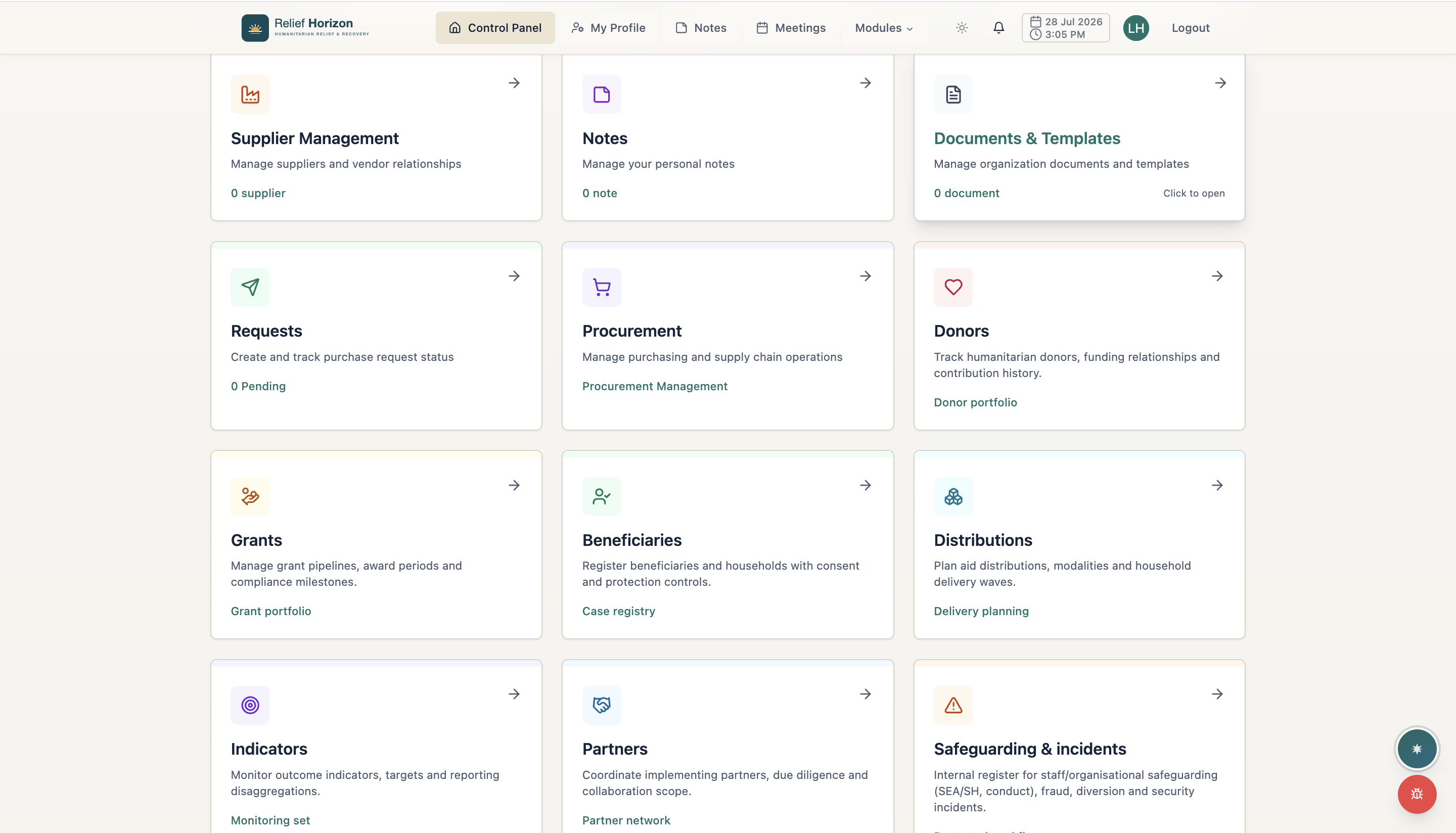
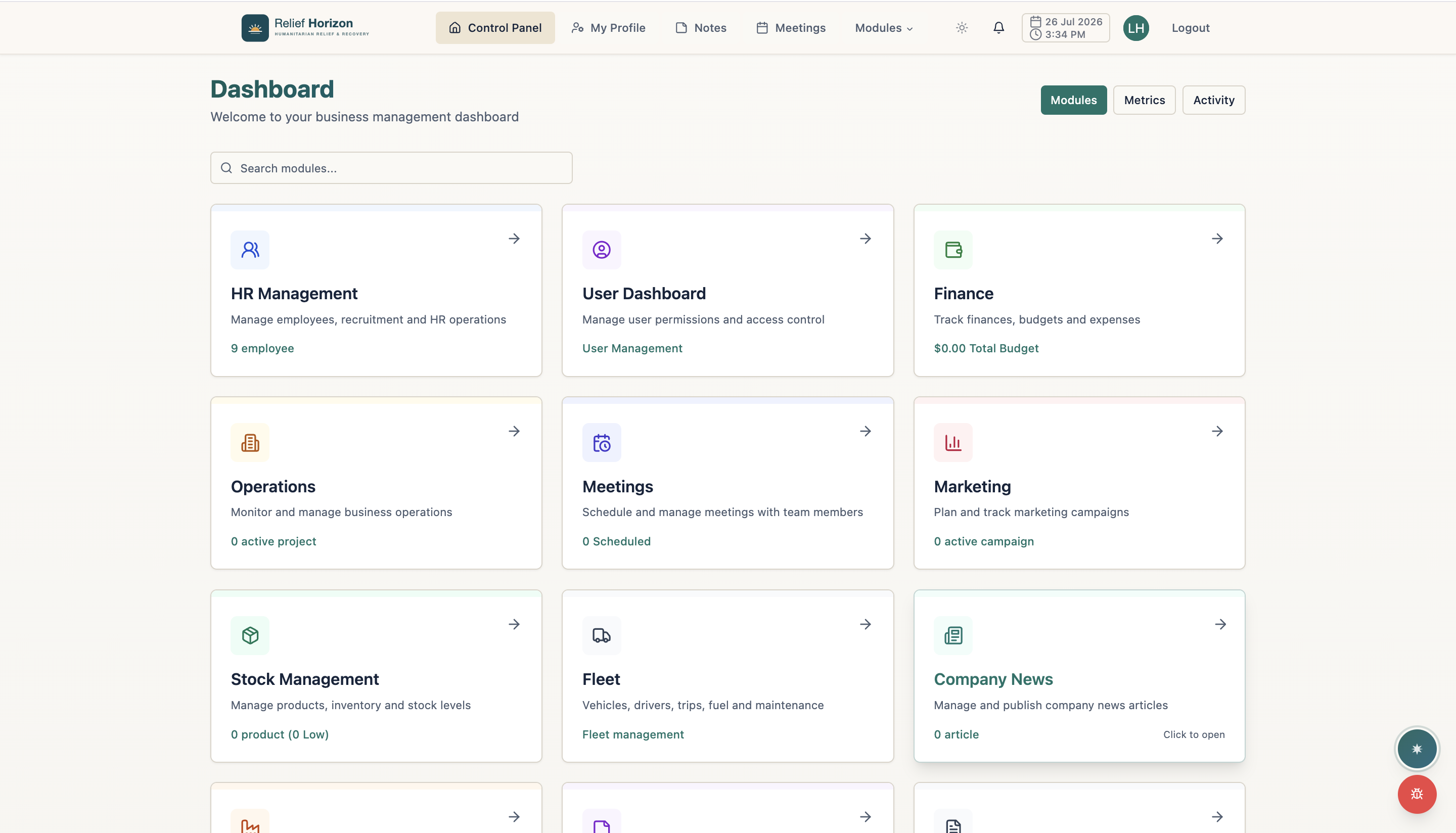
  1. Everything in one control panel

    Everything in one control panel

    HR, finance, operations, procurement, fleet, meetings and more — one workspace for the whole organisation.

  2. Purpose-built humanitarian suite

    Purpose-built humanitarian suite

    Donors, grants, beneficiaries, distributions, indicators and partners, integrated end to end.

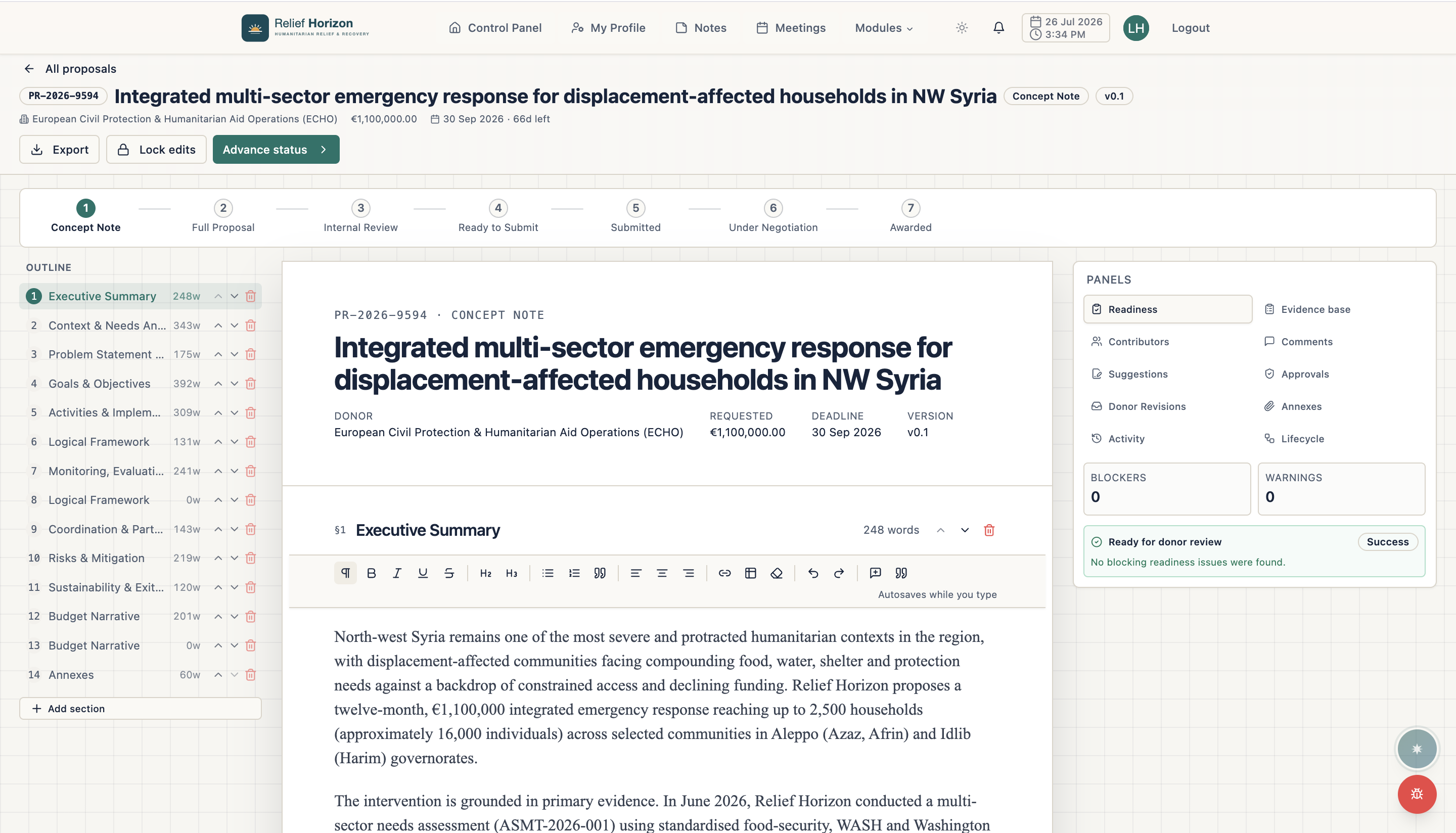
  3. Grant proposal workspace

    Grant proposal workspace

    Take concept notes through to awarded proposals with an outline, readiness checks, approvals and version history.

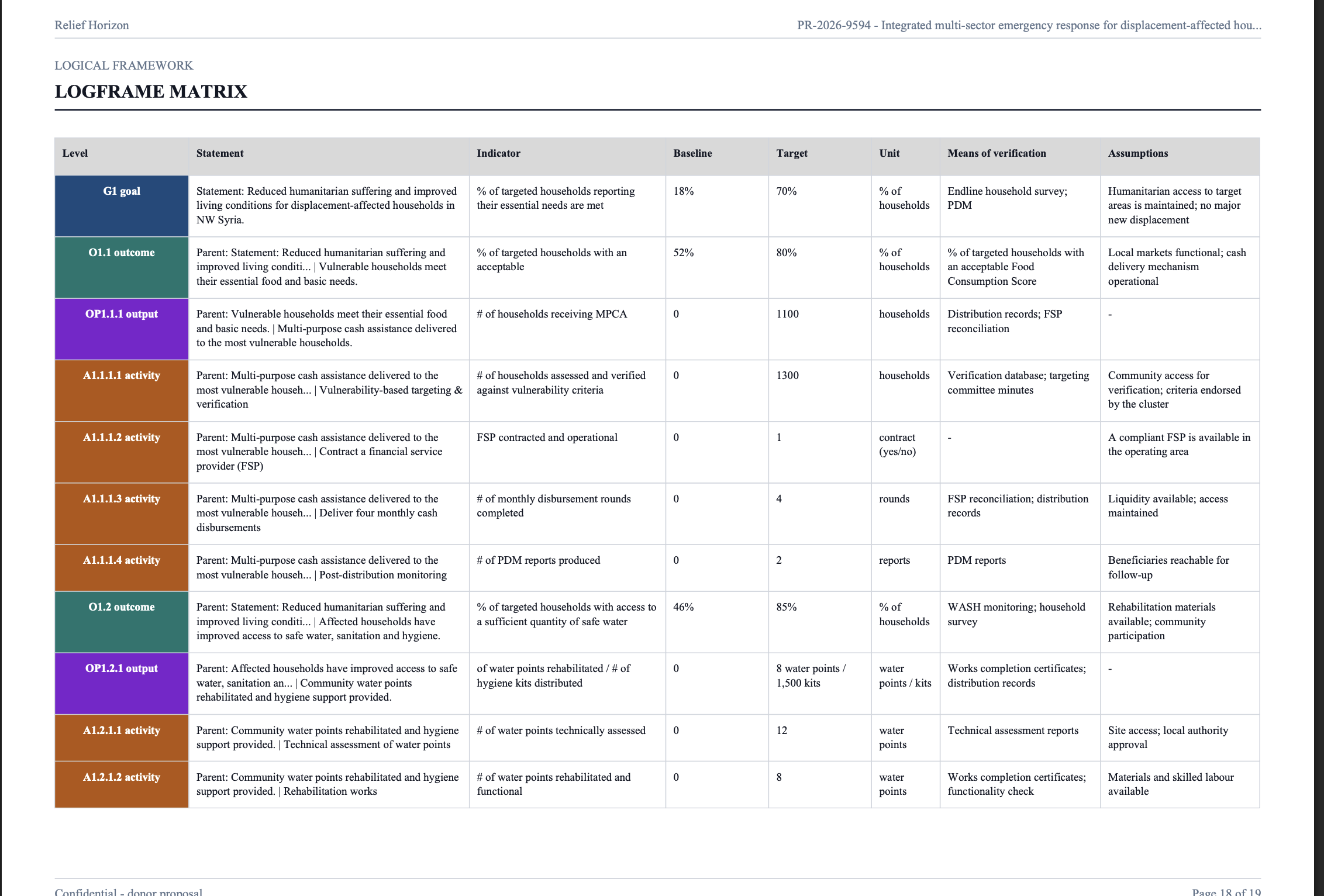
  4. Donor-ready logframe export

    Donor-ready logframe export

    Export a formatted logical framework — goal, outcome, output and activity levels with indicators and means of verification.

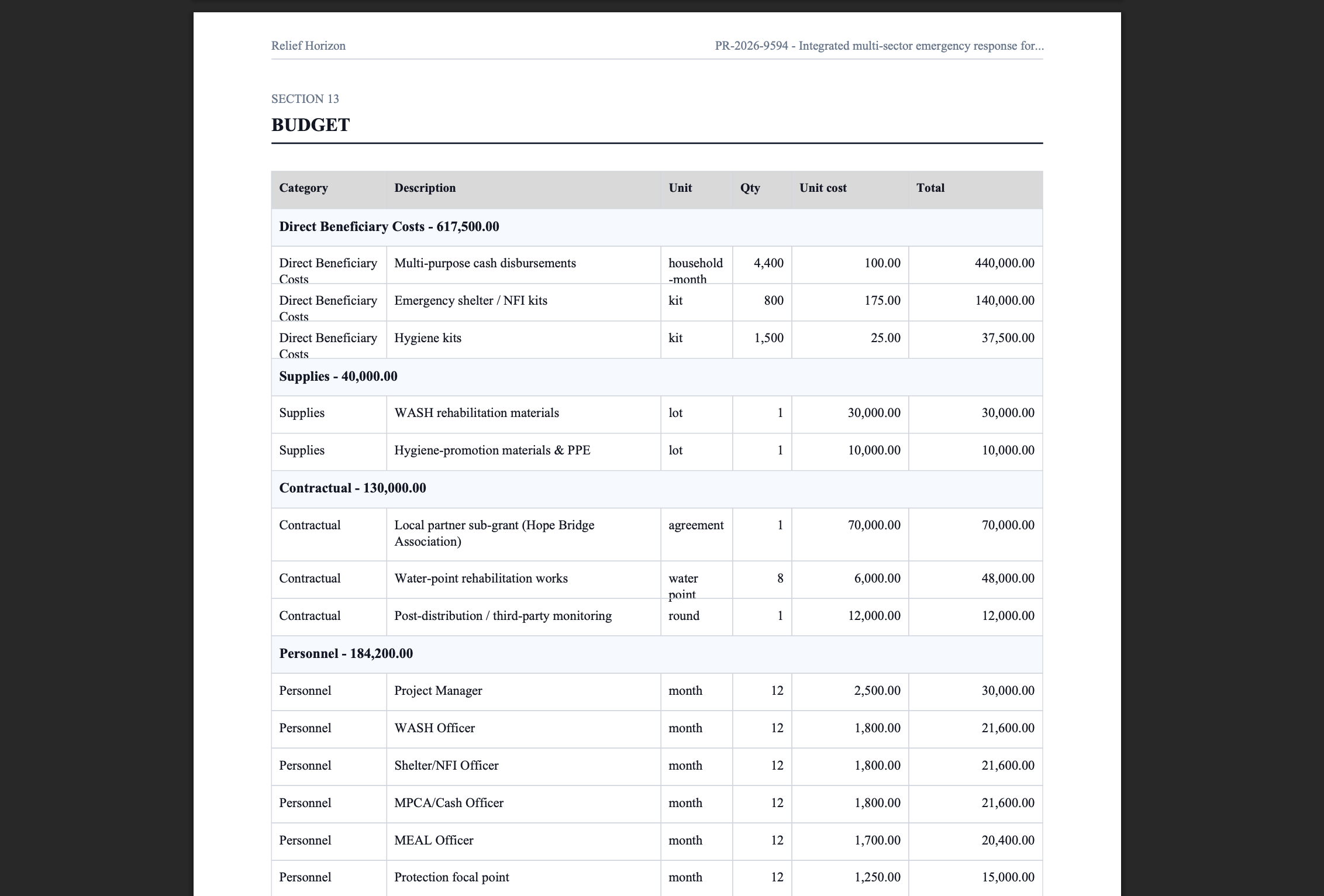
  5. Structured budget export

    Structured budget export

    Export the proposal budget grouped by category with quantities, unit costs and totals.

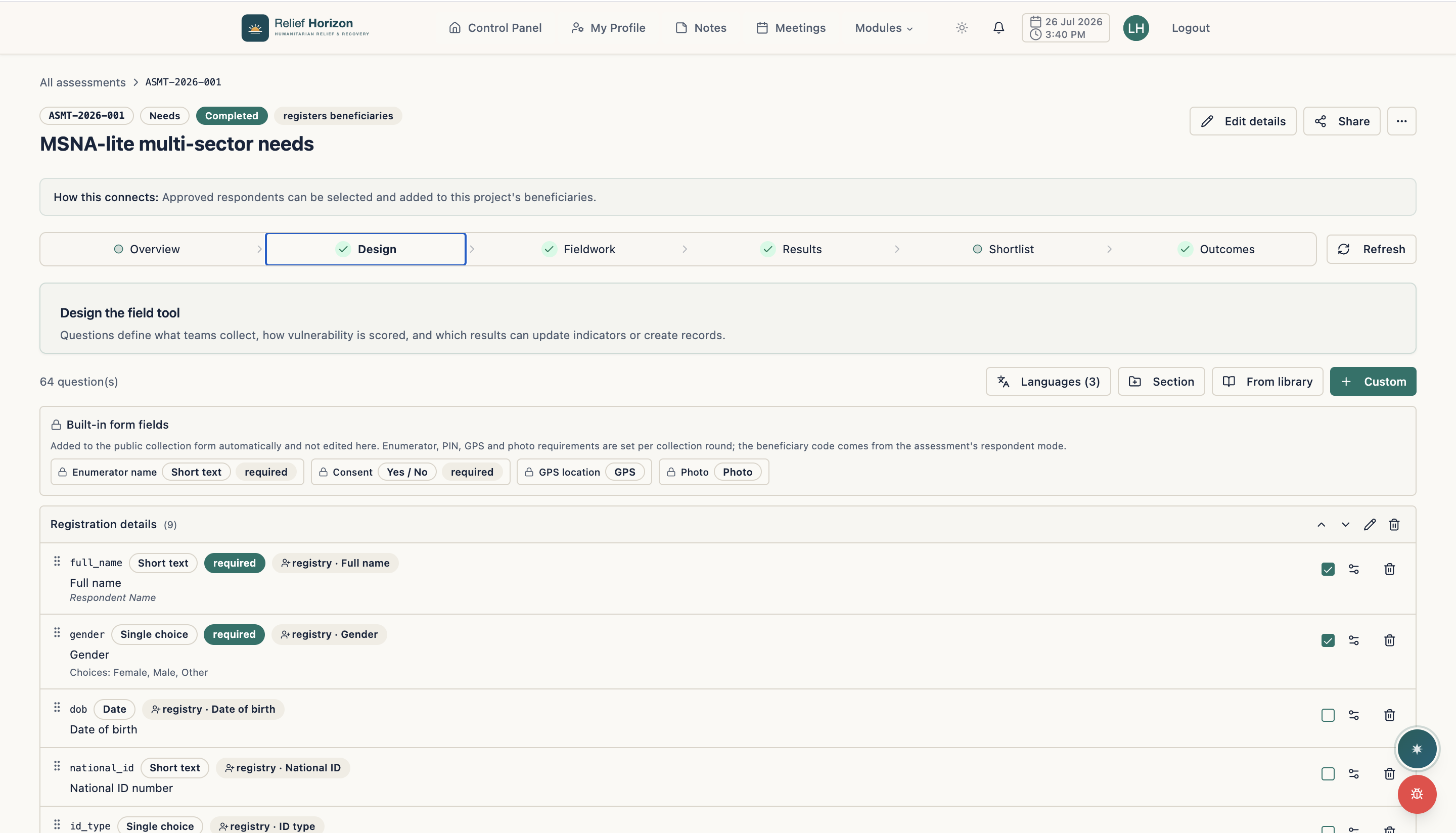
  6. Build assessments in minutes

    Build assessments in minutes

    Design multi-language questionnaires, map answers to the beneficiary registry and score vulnerability automatically.

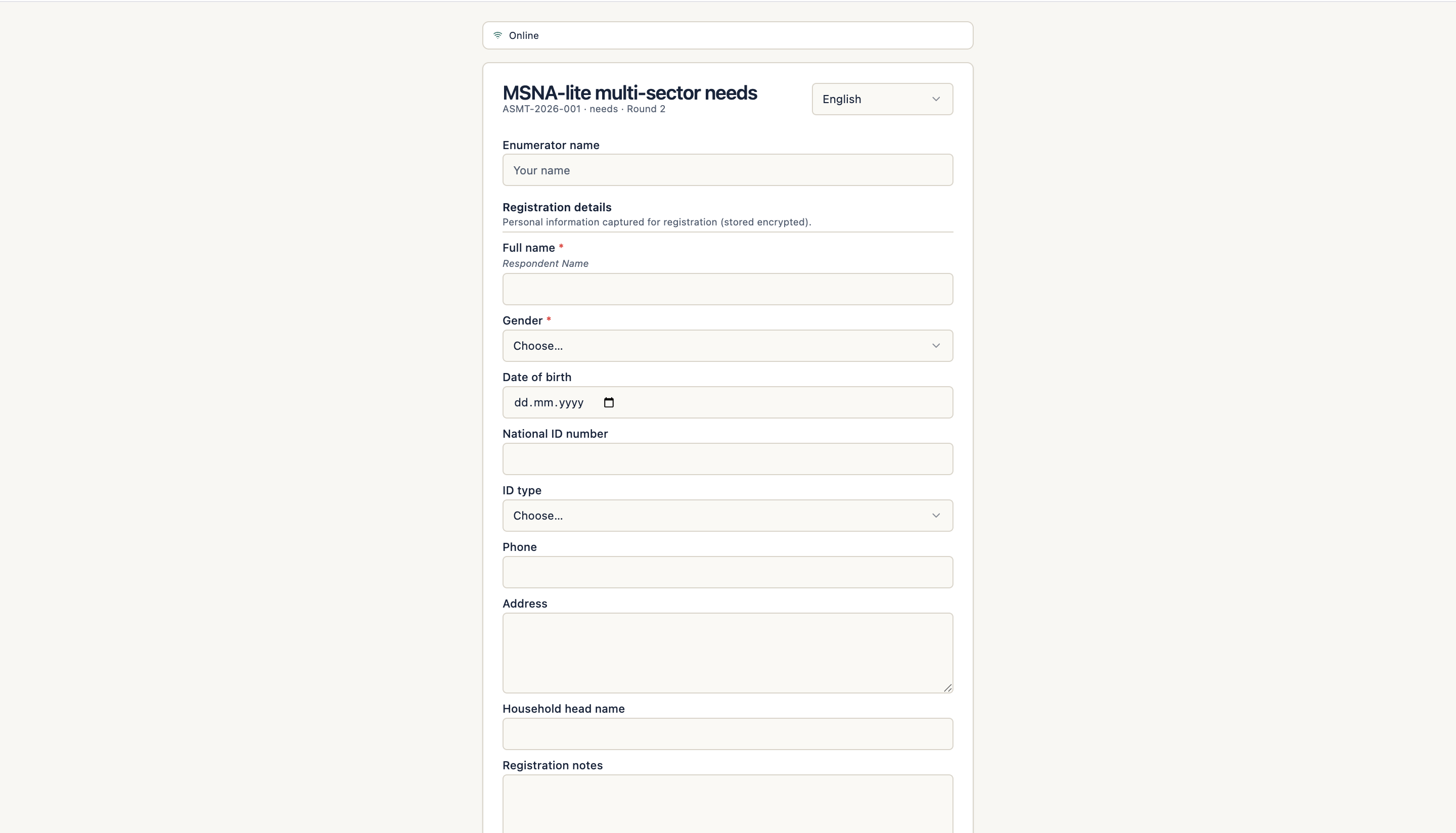
  7. Collect data offline in the field

    Collect data offline in the field

    Enumerators complete a mobile-friendly form; direct identifiers are encrypted with per-organization keys on capture.

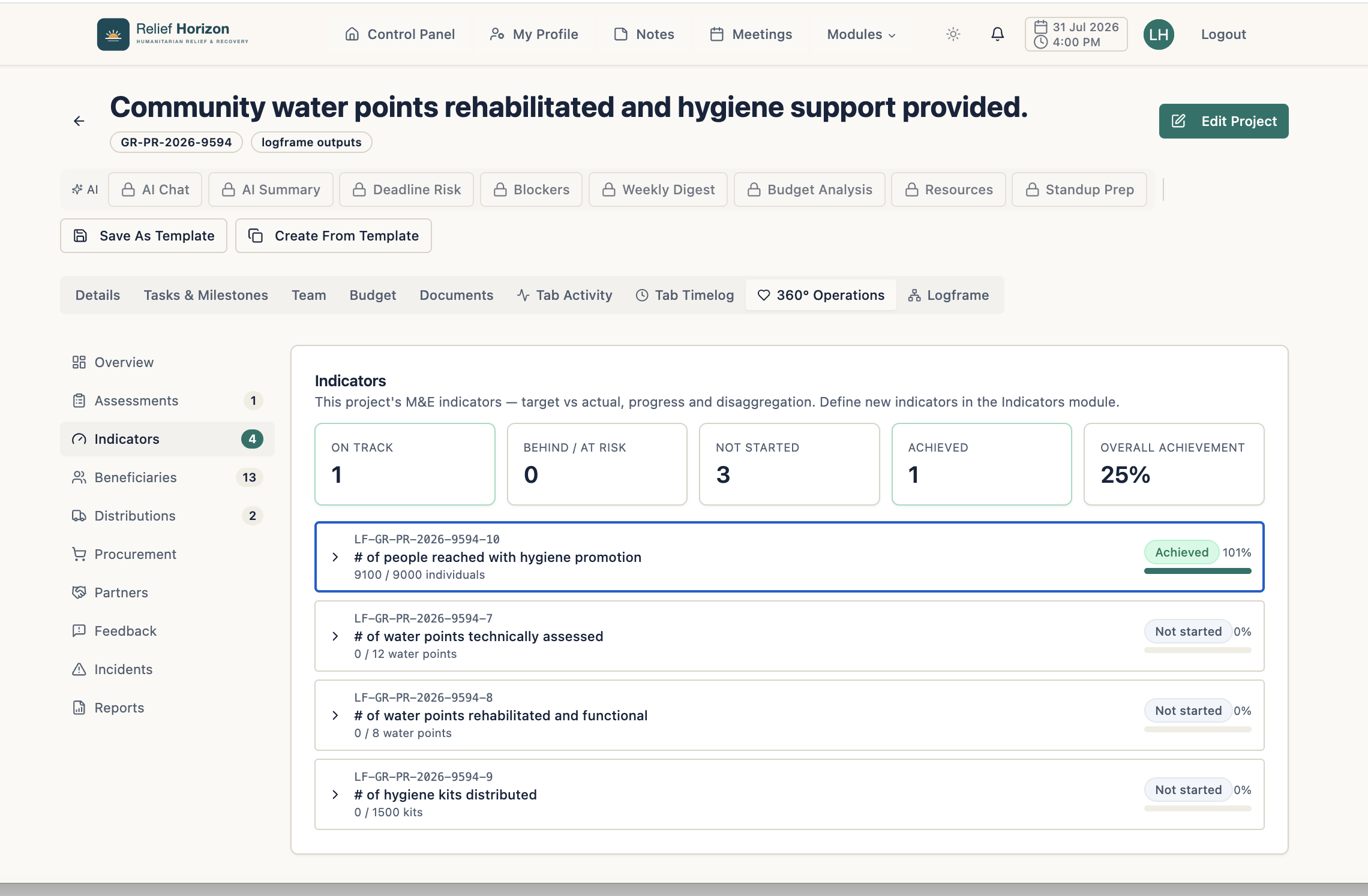
  8. 360° Operations — live M&E indicators

    360° Operations — live M&E indicators

    Track every logframe indicator against target — on-track, at-risk or achieved — inside the project.

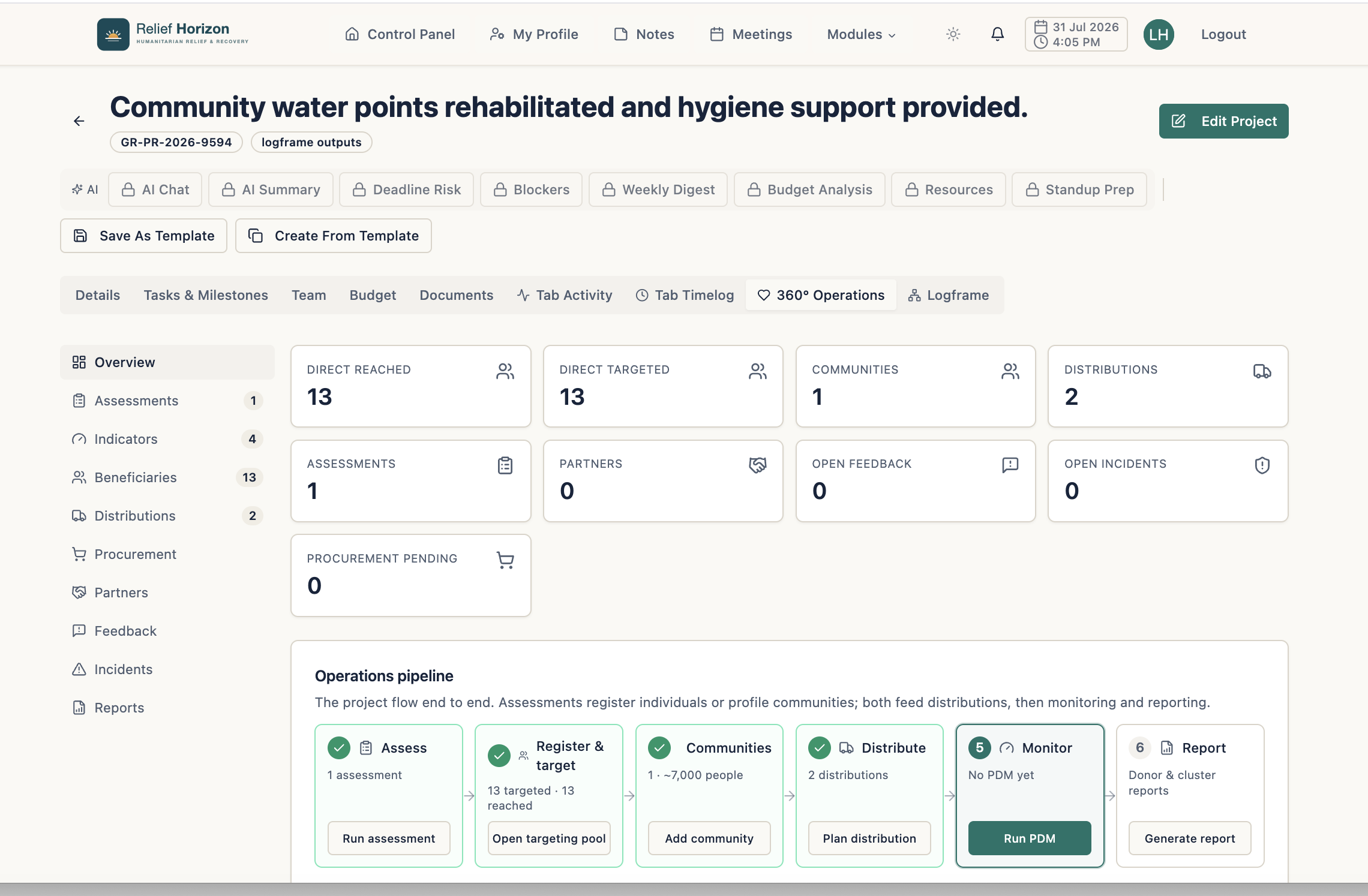
  9. 360° Operations — end-to-end pipeline

    360° Operations — end-to-end pipeline

    Assess, register, distribute, monitor and report — the whole project lifecycle connected in one view.

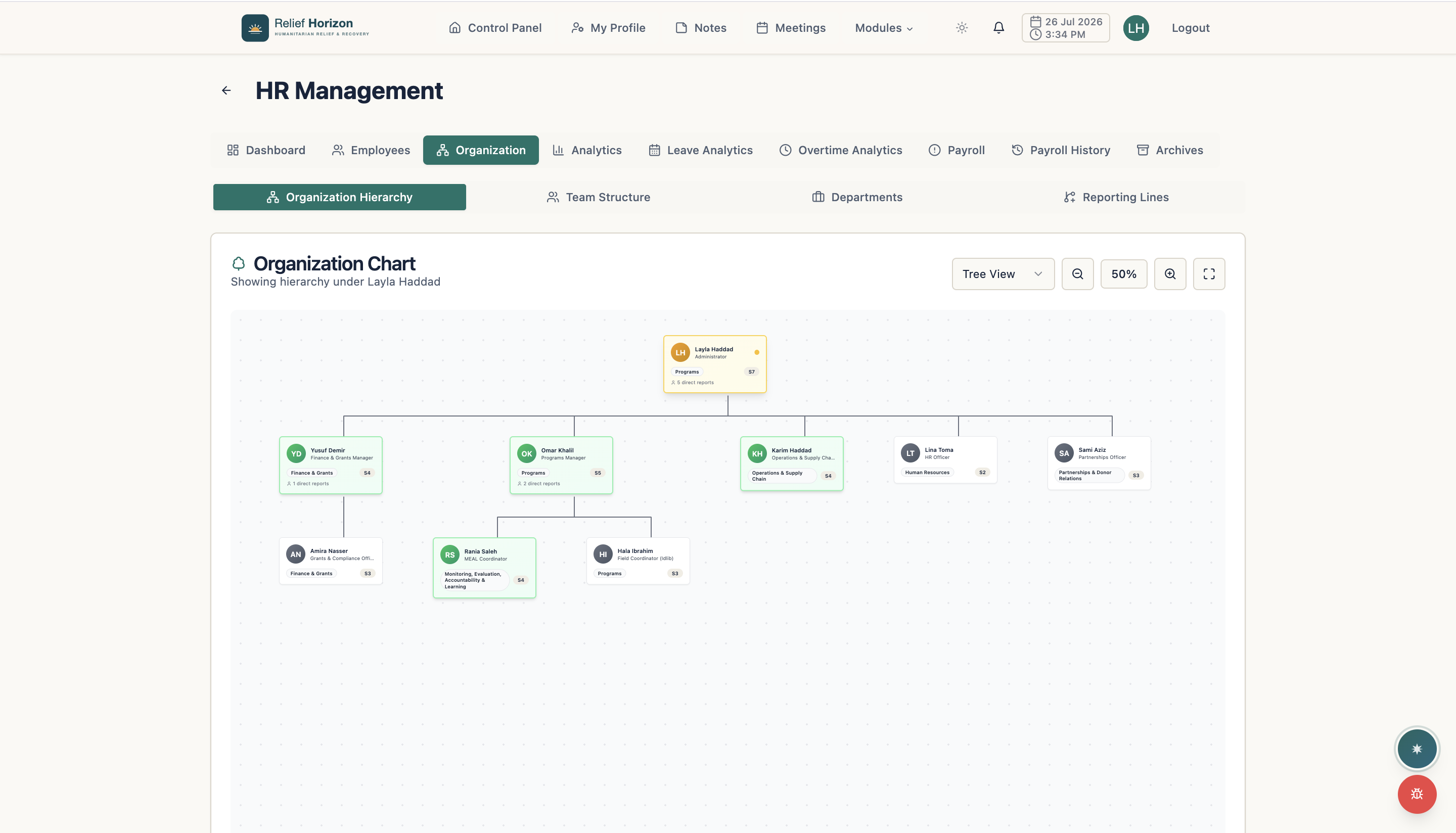
  10. HR and organisation structure

    HR and organisation structure

    Manage employees, payroll and analytics, and see reporting lines on a live org chart.

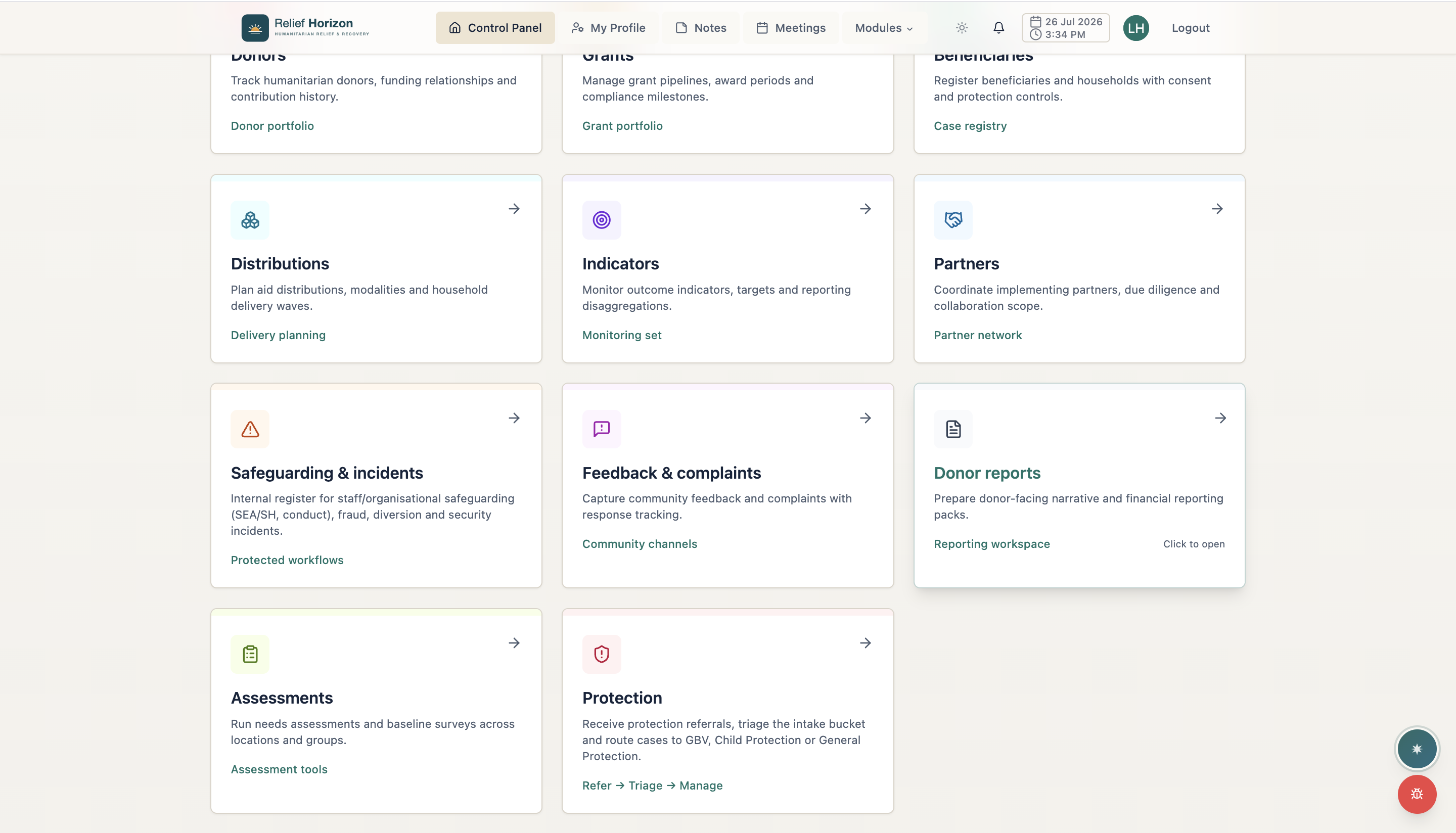
  11. Protection & accountability

    Protection & accountability

    Safeguarding and incident registers, community feedback and complaints, and donor reporting packs.

Screenshot 111

Trust is operational

Controls for sensitive work, without slowing teams down.

Security, access, deployment and implementation choices should reflect how your organization is accountable to communities, staff and donors.

We describe controls that are available in the product and separate them from deployment and customer responsibilities.

Read our security and data-protection approach

Sensitive-data handling

Keep beneficiary, household, donor and staff records in controlled organizational workspaces.

Role-based permissions

Separate drafting, review, approval, finance, procurement, distribution and reporting responsibilities.

Cloud or on-premises

Choose a managed cloud deployment or discuss an on-premises setup for data-residency requirements.

Three working languages

Use English, Turkish or Arabic, including right-to-left marketing and product interfaces for Arabic.

Onboarding and migration

Plan configuration, role setup and spreadsheet migration around the way your teams already work.

Training and support

Remote onboarding is available worldwide, with in-person training arranged in supported regions subject to access.

Grant opportunities

Discover open grants — without trawling a dozen donor portals

We bring open funding calls from major humanitarian and development donors into one filterable directory, so your team finds the right opportunities faster and applies on time.

Browse open grants
  • Filter by sector, country, funder and deadline

  • Verified listings with direct links to the donor

  • Focused on humanitarian and development funders

Implementation

A clear path from discovery to daily use.

Implementation is treated as organizational change: scope first, configure carefully, move the right data, prepare teams and support the launch.

  1. Phase 1

    Discovery

    Map programs, responsibilities, donor obligations and the workflows that matter first.

  2. Phase 2

    Configuration

    Set organizational structures, permissions, approvals, templates and required fields.

  3. Phase 3

    Migration

    Prepare and move agreed records from spreadsheets or existing tools into connected data.

  4. Phase 4

    Training

    Train role-based groups using the real work they will perform in the platform.

  5. Phase 5

    Launch

    Move into production with a clear ownership model and an agreed first operating cycle.

  6. Phase 6

    Support

    Review adoption, resolve issues and refine the configuration as organizational needs evolve.

Transparent pricing

Understand the licence and implementation path before you commit.

Organization pricing is based on annual program budget rather than seat count, so teams and partners are not rationed by per-user licences.

Organization licences start at $9,000 per year. One-time setup is priced separately by budget band.

Limited places

Pilot Program

Free for 12 months

5 organizations.

We are offering a small number of humanitarian organizations the complete platform, free for 12 months, to run a full grant cycle — from proposal budget to donor report.

  • Full humanitarian modules, unlimited users
  • Hands-on onboarding and configuration
  • Priority support — a direct line to our team
  • One full grant cycle, from proposal budget to donor report
Most common

Organization

From $9,000/ year

Priced by annual program budget. Unlimited users.

An annual licence for the whole organization — every humanitarian and operations module, one predictable figure you can budget a year ahead.

  • All humanitarian + operations modules
  • Unlimited users — staff, field teams, partners and sub-grantees
  • Managed cloud hosting and product updates under agreed service terms
  • English, Arabic and Turkish with full right-to-left support
  • Support and training arrangements confirmed during implementation
  • AI assistant included
On-premises

Enterprise / Sovereign

Custom

On-premises or private cloud, with data residency.

For governments, UN agencies and INGOs whose data cannot leave their own infrastructure, or who need the system wired into what they already run.

  • Self-hosted or private-cloud deployment
  • Hosting location and residency responsibilities documented during procurement
  • Identity and custom integrations scoped where required
  • Support arrangements documented for the selected deployment
  • Implementation and operational responsibilities agreed before launch

Budgeting this into a donor proposal? See how to write it into your budget

Practical answers

Questions organizations ask before a demo.

Clear information about scope, pricing, deployment, language and implementation.

What is Humanitarian Ops?
Humanitarian Ops is one connected operating platform for humanitarian organizations. It links assessments, proposals, grants, projects, beneficiaries, distributions, MEAL and donor reporting with finance, people, procurement, supply, engagement and organizational operations.
Is it a program tool or an ERP?
It is designed to connect both responsibilities. Program teams use humanitarian workflows while finance, people, procurement, supply and leadership work from the same organizational records. There is no separate humanitarian edition and operations edition to reconcile.
How much does it cost?
Organization licences start at $9,000 per year and are priced by annual program budget. Published bands include unlimited users. A one-time setup fee covers configuration, data structure design and launch support; complete figures are available on the pricing page.
How is access to sensitive information controlled?
The platform uses role-based permissions and row-level data controls to separate access between organizations and responsibilities. During implementation, roles are configured around who can draft, review, approve, finance, procure, distribute and report.
Can it be deployed on our own infrastructure?
Yes. Humanitarian Ops is available as a managed cloud service, and an on-premises deployment can be discussed where data-residency or organizational requirements call for it.
Which languages and onboarding options are available?
The interface supports English, Turkish and Arabic, including right-to-left layout for Arabic. Remote onboarding is available worldwide; in-person training can be arranged in supported regions subject to access and security conditions.

Start with your real workflow

See how one connected platform would work across your organization.

Tell us about your programs, funding, teams, reporting obligations and deployment needs. We will tailor the conversation to the work you actually do.