
One source of truth
Grants, budgets, delivery, procurement, finance and donor reporting remain connected to the same program record.
One connected operating platform
Plan programs, manage grants and budgets, support teams, deliver assistance, protect sensitive data, measure results and report to donors from one system.
Tell us about your programs. We usually reply within two business days.
A dependable operating foundation
Humanitarian teams need more than a list of modules. They need information to remain connected, decisions to stay traceable and deployment choices that fit their responsibilities.
Designed around practical governance, field coordination and long-term organizational use.
Grants, budgets, delivery, procurement, finance and donor reporting remain connected to the same program record.
Approvals, permissions, review history and supporting evidence stay visible from decision to delivery.
English, Turkish and Arabic interfaces—including right-to-left layouts—help distributed teams work consistently.
Choose managed cloud or self-hosted deployment to support operational, infrastructure and data-residency requirements.
A shared source of truth
Program and operational teams keep their specialist workflows while working from records that stay connected across the organization.
One program lifecycle
Each step carries its approvals, budgets, people and evidence forward, so program delivery and organizational operations remain aligned.
Capture assessments and field context before design.
Prepare donor-ready narratives, budgets and logframes.
Track awards, periods, allocations and report schedules.
Turn funded outputs into implementation projects and tasks.
Record distributions, stock movement and field delivery.
Follow targets, results, assumptions and verification.
Build donor report packs from live grant data.
One organization. One source of truth.
Humanitarian Ops brings program delivery and organizational operations together. These are connected responsibilities—not separate editions or isolated modules.
Explore all capabilitiesTurn evidence into fundable programs, maintain donor context and carry approved budgets into implementation.
Coordinate people, partners, supplies, vehicles and protection responsibilities around approved program work.
Keep indicators, community feedback, evidence and donor obligations connected to the work they describe.
Support the people, permissions, approvals and internal coordination that responsible delivery depends on.
Product evidence
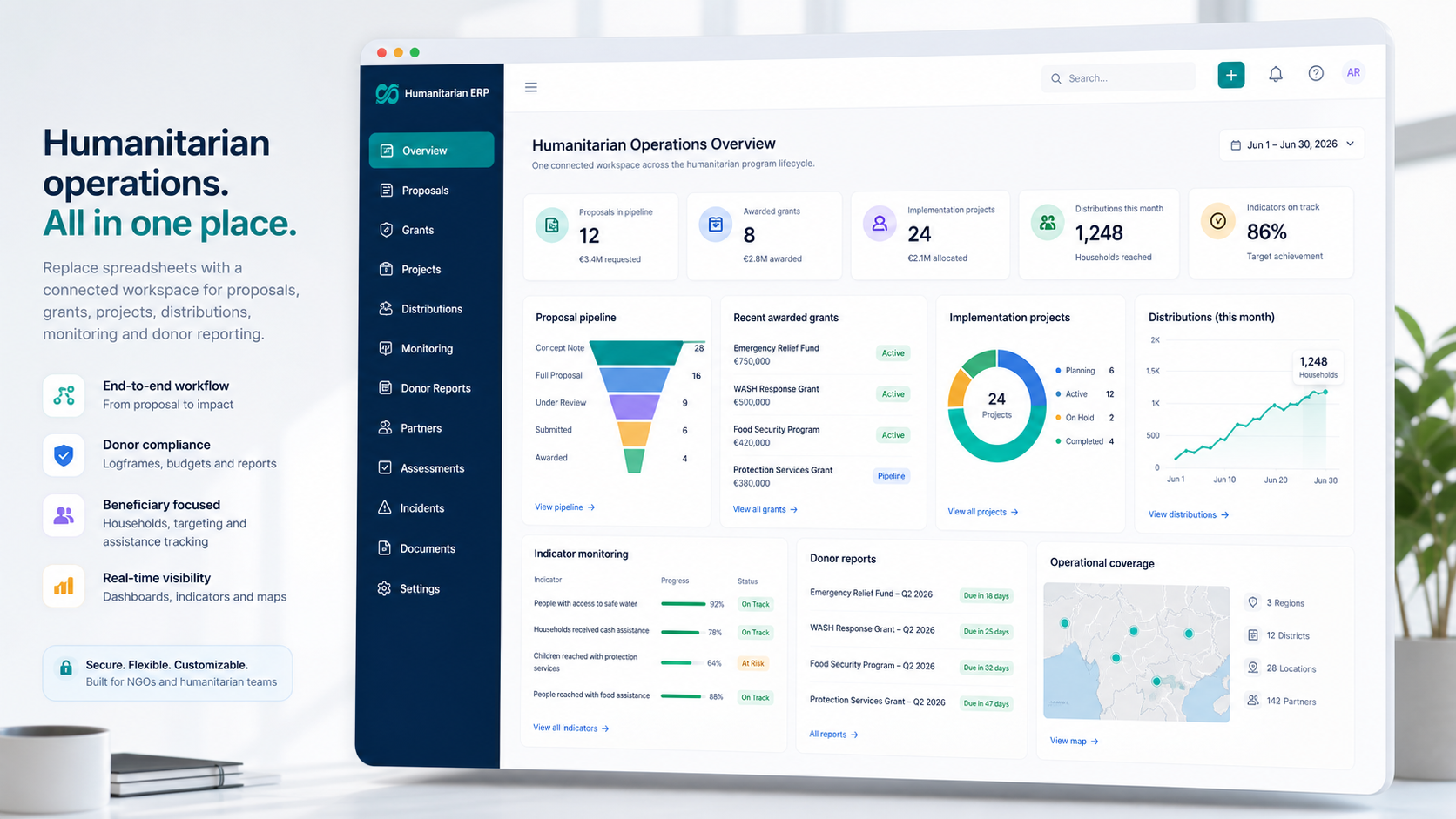
Real, locally hosted product screens are shown in the selected language. No stock interface mockups and no external image fallback.
Screenshot 1 / 2
Trust is operational
Security, access, deployment and implementation choices should reflect how your organization is accountable to communities, staff and donors.
We describe controls that are available in the product and separate them from deployment and customer responsibilities.
Read our security and data-protection approachKeep beneficiary, household, donor and staff records in controlled organizational workspaces.
Separate drafting, review, approval, finance, procurement, distribution and reporting responsibilities.
Choose a managed cloud deployment or discuss an on-premises setup for data-residency requirements.
Use English, Turkish or Arabic, including right-to-left marketing and product interfaces for Arabic.
Plan configuration, role setup and spreadsheet migration around the way your teams already work.
Remote onboarding is available worldwide, with in-person training arranged in supported regions subject to access.
Implementation
Implementation is treated as organizational change: scope first, configure carefully, move the right data, prepare teams and support the launch.
Map programs, responsibilities, donor obligations and the workflows that matter first.
Set organizational structures, permissions, approvals, templates and required fields.
Prepare and move agreed records from spreadsheets or existing tools into connected data.
Train role-based groups using the real work they will perform in the platform.
Move into production with a clear ownership model and an agreed first operating cycle.
Review adoption, resolve issues and refine the configuration as organizational needs evolve.
Transparent pricing
Organization pricing is based on annual program budget rather than seat count, so teams and partners are not rationed by per-user licences.
Organization licences start at $9,000 per year. One-time setup is priced separately by budget band.
5 partner organizations. 5 places remaining.
We are taking a small number of organizations through a full grant cycle with us, and building the product around what they run into.
Priced by annual program budget. Unlimited users.
An annual licence for the whole organization — every humanitarian and operations module, one predictable figure you can budget a year ahead.
On-premises or private cloud, with data residency.
For governments, UN agencies and INGOs whose data cannot leave their own infrastructure, or who need the system wired into what they already run.
Budgeting this into a donor proposal? See how to write it into your budget
Practical answers
Clear information about scope, pricing, deployment, language and implementation.
Start with your real workflow
Tell us about your programs, funding, teams, reporting obligations and deployment needs. We will tailor the conversation to the work you actually do.